
Excel Ranges
 Use:
Use: - Many Excel functions allow the user to specify data by means of one
or more range arguments. Ranges can be as simple as a single cell or as
complex as a list of disjoint rectangles.
- Syntax:
- Single Cell:
- Sheet!ColRow
- List of Cells:
- Individual cell addresses separated by commas
Sheetx!ColaRowa , Sheety!ColbRowb
, ...
- Adjacent Rectangle:
- Top-left and bottom-right cell addresses separated by colon
Sheet!ColaRowa:ColbRowb
- List of Rectangles:
- Sheetx!ColaRowa:ColbRowb , Sheety!ColcRowc:ColdRowd
, ...
- Examples:
- Single Cell:
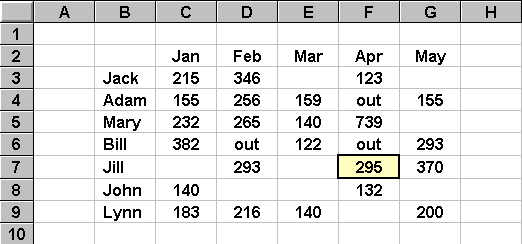
- Sheet1!F7 ( or simply F7 ) contains the number 295
- List of Cells:
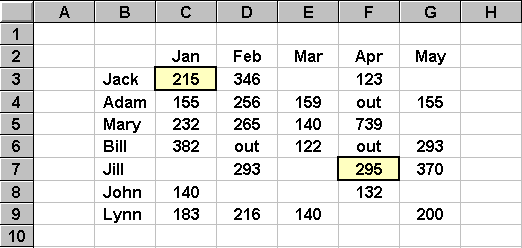
- Sheet1!C3,Sheet1!F7 ( or simply C3,F7 ) contains the numbers 215 and
295
- Row of Cells:
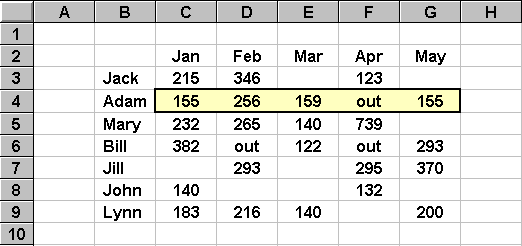
- Sheet1!C4:G4 ( or simply C4:G4 ) contains four numbers and the string
"out"
- Column of Cells:
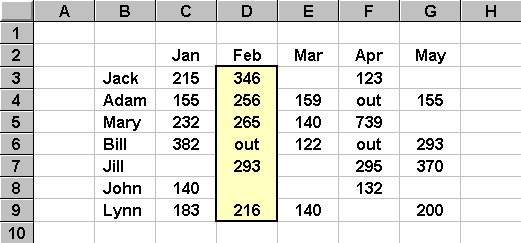
- Sheet1!D3:D9 ( or simply D3:D9 ) contains five numbers, the string
"out" and one blank cell
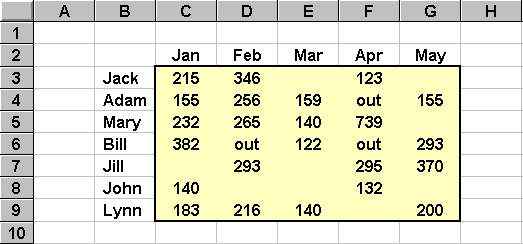
- Rectangle of Adjacent Cells:
- Sheet1!C3:G9 ( or simply C3:G9 ) contains 23 numbers, three "out"
strings and nine blank cells
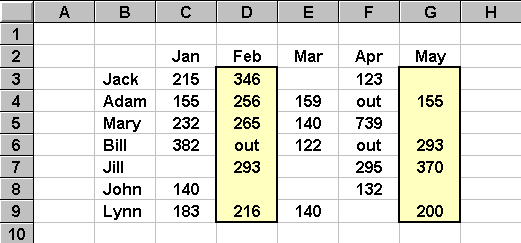
- Disjoint Cells:
- Sheet1!D3:D9,Sheet1!G3:G9 ( or simply D3:D9,G3:G9 ) contains nine numbers,
the string "out" and four blank cells
- Note:
- Care must be taken when a list of overlapped rectangles is specified.
Excel treats the overlapped cells as multiple cells. This can cause problems
with some functions (e.g., COUNT, SUM).
For instance, the list D3:D5,C4:E4 includes cell D4 twice. Excel will
treat the list as six numbers instead of five. It will compute a SUM of
1,437 instead of 1,181.

- Related
Topics:
- Single Cells, Relative
& Absolute Addresses
 Home | Lectures | Handouts
| Assignments | Exams
| Grades | Odds &
Ends
Home | Lectures | Handouts
| Assignments | Exams
| Grades | Odds &
Ends
 This web site is maintained by John Mote for
use by students in his MIS
311F class. Your comments and questions are
more than welcome.
This web site is maintained by John Mote for
use by students in his MIS
311F class. Your comments and questions are
more than welcome.